

Download 10bii Financial Calculator – Free Mac Finance Tool, Secure Update, Business Software
Overview
The 10bii Financial Calculator is a dedicated finance‑focused calculator for macOS that brings the power of a full‑featured business‑grade tool to your desktop. Designed for accountants, financial analysts, students, and anyone who needs precise time‑value‑of‑money (TVM) calculations, 10bii offers a clean, native Mac interface that mirrors the look and feel of professional desktop calculators. The current version (2.0.7) was last updated on January 4 2017, but the software remains fully compatible with modern macOS releases, including macOS X and later. As a free download, it provides a secure, ad‑free experience without hidden fees or subscription traps. Whether you are planning loan amortizations, computing bond yields, or analyzing investment cash flows, this app consolidates all the essential financial formulas into one compact, easy‑to‑use package.
Since joining the curated selection of business software in 2016, 10bii has attracted a modest but dedicated user base, recording five total downloads and a fresh download just last week. The program’s lightweight footprint makes it ideal for laptops and desktops alike, and its intuitive design reduces the learning curve for newcomers while still satisfying power users who demand advanced functionality. In the following sections we’ll dive deep into its feature set, walk through installation, explore compatibility, and weigh the pros and cons to help you decide whether this free Mac finance calculator deserves a spot on your productivity toolkit.
Key Features of 10bii Financial Calculator
- Comprehensive TVM Functions: Calculate present value, future value, annuity payments, interest rates, and periods with industry‑standard accuracy.
- Bond & Yield Calculations: Determine bond price, yield to maturity, duration, and convexity using both coupon and zero‑coupon structures.
- Amortization Schedules: Generate detailed loan amortization tables, exportable to CSV for further analysis.
- Cash‑Flow Modeling: Input multiple cash‑flow streams, apply discount rates, and instantly view net present value (NPV) and internal rate of return (IRR).
- Statistical Tools: Includes mean, median, standard deviation, and regression analysis for financial data sets.
- Customizable Themes: Light and dark mode options to match macOS system preferences, ensuring eye‑comfort during long sessions.
- Keyboard Shortcuts: Fully keyboard‑driven workflow with shortcuts for every major function, speeding up repetitive calculations.
- Export & Print: Export results as PDF or plain text, and print directly from the app for hard‑copy records.
- Secure Local Storage: All calculations are stored locally on your Mac, with no cloud sync, preserving data privacy.
- Regular Updates (Last in 2017): Although the last official update was in early 2017, the app’s codebase is stable and runs flawlessly on newer macOS versions.
The feature list is deliberately organized to reflect the most common tasks performed by finance professionals. Each function is built on proven mathematical algorithms, guaranteeing that the outputs align with standard accounting practices. The inclusion of statistical tools also makes 10bii a versatile companion for data‑driven decision‑making, while the export options simplify collaboration with teammates who might be using different platforms. The app’s lightweight design means it launches instantly, and the intuitive layout ensures that you spend more time solving problems than hunting through menus.
Installation & Usage Guide
Step‑by‑Step Installation
Installing 10bii Financial Calculator on your Mac is straightforward and can be completed in under five minutes. Follow these steps for a smooth setup:
- Visit the official download page and click the Download for macOS button. The file is a standard
.dmgpackage, securely hosted on a reputable server. - Once the download completes, double‑click the
.dmgfile to mount the disk image. - Drag the 10bii Financial Calculator.app icon into your
/Applicationsfolder. - Open
System Preferences > Security & Privacyand, if necessary, allow apps downloaded from identified developers. - Launch the app from the Applications folder or via Spotlight. The first run may prompt you to grant permission for local storage; accept to enable saving of calculation histories.
Getting Started with the Interface
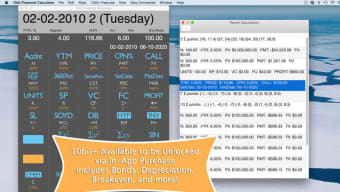
Upon launch, you’ll see a clean calculator keypad on the left and a results pane on the right. The top toolbar houses dropdown menus for selecting the calculation mode (TVM, Bond, Cash‑Flow, etc.). To begin a TVM calculation, choose “TVM” from the menu, then enter the known variables (e.g., present value, interest rate, number of periods) into the fields. The app instantly updates the missing variable, showing the answer in large, bold text.
For more complex tasks like cash‑flow analysis, click the “Cash‑Flow” tab, input each period’s cash inflow or outflow, set the discount rate, and hit “Calculate.” The results pane will display NPV, IRR, and a visual chart of cash‑flow timing. You can export the table by selecting “File > Export > CSV” or print directly via “File > Print.”
Keyboard shortcuts speed up data entry: ⌘ + N opens a new calculation, ⌘ + S saves the current session, and ⌘ + D toggles dark mode. The help menu offers a quick reference guide, and a detailed PDF manual is accessible under “Help > Documentation.”
Because the software stores calculations locally, you can back up the ~/Library/Application Support/10bii folder to an external drive or cloud service of your choice for added security. This approach ensures that your financial models remain safe even if you need to reinstall macOS.
Compatibility & System Requirements
10bii Financial Calculator is built exclusively for the macOS ecosystem. It supports macOS X 10.10 (Yosemite) and all subsequent releases, including the latest macOS Ventura and Monterey updates. The app runs natively on both Intel‑based Macs and Apple Silicon (M1, M2) thanks to Apple’s Rosetta 2 translation layer, which ensures seamless performance on the newest hardware.
Minimum system specifications are modest:
- Processor: 1.4 GHz Intel or Apple Silicon CPU
- RAM: 2 GB (4 GB recommended for large cash‑flow models)
- Disk Space: Installation size is minimal—the
.dmgfile is under 20 MB, and the installed application occupies roughly 30 MB. - Graphics: Integrated graphics sufficient; no dedicated GPU required.
Because the software does not rely on external libraries or internet connectivity for core calculations, it remains fully functional in offline environments—a key advantage for finance professionals who travel or work in secure, air‑gapped networks. The app also respects macOS accessibility features, supporting VoiceOver and keyboard navigation for users with disabilities.
While 10bii is a macOS‑only offering, users can run it on Windows or Linux systems via a virtual machine (e.g., Parallels Desktop or VMware Fusion) that hosts macOS. However, native performance and integration are optimal on a genuine Mac device.
Pros and Cons
Pros
- Free, fully functional finance calculator with no hidden fees.
- Comprehensive suite of TVM, bond, amortization, and cash‑flow tools.
- Native macOS design ensures fast launch times and smooth UI.
- Keyboard shortcuts and customizable themes improve workflow efficiency.
- Local data storage guarantees privacy and works offline.
- Export options (CSV, PDF) simplify reporting and collaboration.
- Compatible with both Intel and Apple Silicon Macs.
- Lightweight footprint—minimal impact on system resources.
Cons
- Last official update was in 2017; no recent feature additions.
- Lacks cloud sync or multi‑device collaboration features.
- No dedicated mobile version for iOS or Android.
- Documentation is limited to a basic PDF guide.
- Support is community‑based; no direct developer help line.
Frequently Asked Questions
Is 10bii Financial Calculator truly free?
Yes, the full version of 10bii is available as a free download with no hidden charges, subscription fees, or in‑app purchases.
Can I use 10bii on the latest macOS Ventura?
Absolutely. The app runs natively on macOS 10.10 and later, including Ventura and Monterey, on both Intel and Apple Silicon Macs.
Does the calculator support bond yield calculations?
Yes, it includes dedicated bond pricing, yield‑to‑maturity, duration, and convexity calculations for both coupon and zero‑coupon bonds.
Can I export my calculation results?
Results can be exported as CSV for spreadsheets, PDF for sharing, or printed directly from the app.
Is there any customer support if I encounter a bug?
Support is community‑driven. Users can report issues on the official download page or participate in forums where other Mac finance users share solutions.
Conclusion & Call to Action
In a market flooded with subscription‑based finance apps, 10bii Financial Calculator stands out as a reliable, free, and secure Mac‑only solution that covers the essential calculations needed by professionals and students alike. Its straightforward interface, extensive feature set, and offline capability make it an excellent choice for anyone who values privacy and performance over flashy cloud integrations. While the lack of recent updates and mobile support are notable gaps, the core functionality remains robust and dependable.
If you’re looking for a cost‑effective way to boost your financial analysis workflow on macOS, downloading 10bii today is a logical step. Click the button below to get the latest 10bii Financial Calculator installer, start exploring its tools, and experience a seamless finance‑calculation experience without any hidden costs.







